
How to Generate Payment Report
Keeping track of your payment history is an important part of managing your freelance work. Ditansource provides a simple and convenient way to generate payment reports, allowing you to review your earnings for a specific period. Whether you need the report for your personal records, financial tracking, accounting purposes, or tax preparation, the Payment Report feature helps you access your transaction history quickly and efficiently.
To generate a payment report, first log in to your Ditansource account using your registered email address and password. Once you have successfully signed in, you will be directed to your dashboard. From there, navigate to the Freelancer Pad, where you will find various freelancer-related options and tools designed to help you manage your projects, payments, and account activities.
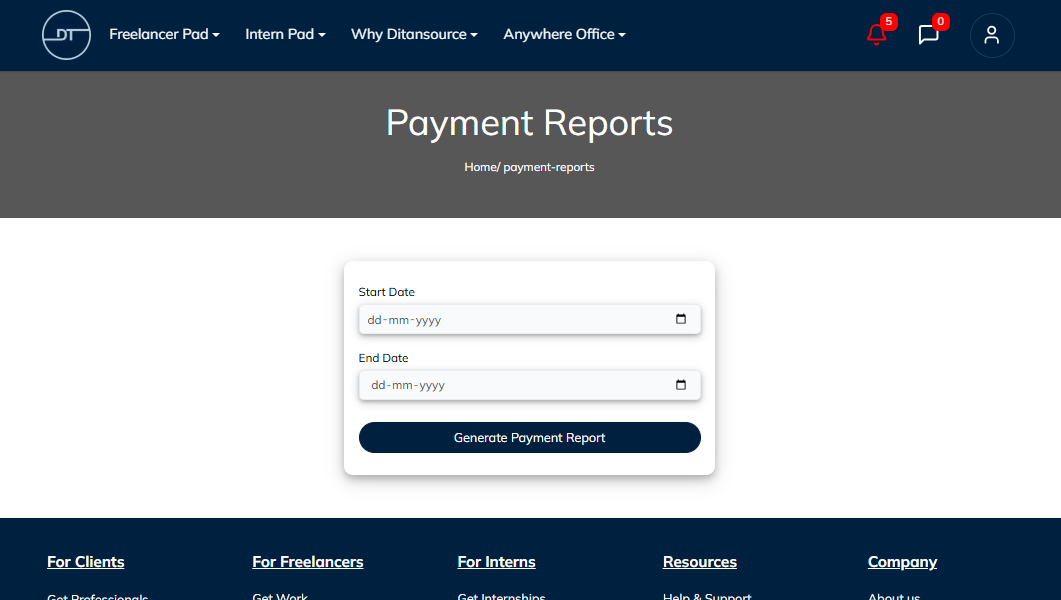
Under the Freelancer Pad menu, click on Generate Payment Report. This will open the payment report page, where you can customize the report based on your preferred date range. You will see two date fields labeled Start Date and End Date. Select the beginning date and the ending date for the period you want to include in your report. Choosing the correct date range ensures that the generated report contains only the payment transactions that fall within the selected timeframe.

After selecting both dates, carefully review your selection to make sure the date range is accurate. Once you are satisfied with the selected period, click the Generate Payment Report button. Ditansource will automatically generate your payment report based on the dates you have provided. The report will include the payment information available for that period, allowing you to review your earnings and transaction history in one place.
Generating payment reports regularly is a useful way to monitor your freelance income and maintain organized financial records. Many freelancers use these reports to track monthly or yearly earnings, reconcile payments received from clients, prepare financial documents, or maintain records for tax filing purposes. Instead of manually checking individual transactions, the payment report provides a convenient summary that saves both time and effort.
Before generating your report, make sure you select the correct start and end dates to avoid missing any transactions. If you have received payments over multiple months, you can generate separate reports for different periods whenever required. This flexibility makes it easier to organize your payment history according to your personal or business needs.
If no payments were received during the selected date range, your report may not display any transaction records. In such cases, simply adjust the selected dates and generate the report again. Keeping your payment reports updated can also help you monitor completed payments and maintain accurate records of your freelance activities on Ditansource.
The Payment Report feature is designed to provide freelancers with quick access to their payment information without requiring any complicated steps. The entire process takes only a few moments, making it simple to generate reports whenever you need them. Whether you are reviewing your recent earnings, preparing financial statements, or maintaining documentation for future reference, the Payment Report tool helps you access your payment history in a clear and organized manner.
By following these steps, you can easily generate a Payment Report on Ditansource and keep an organized record of your payment transactions. If you experience any issues while generating your report or need additional assistance, please contact our support team at contact@ditansource.com, and we will be happy to help you.