
How to View Your Account Settings
Managing your account settings is an important part of maintaining your Ditansource account. The Account Settings section allows you to view your registered account information and manage essential account preferences from one convenient location. Whether you want to improve your account security, update your authentication settings, request a legal name change, or disable your account, all of these options are available within the Account Settings page. Keeping your account information accurate and your security settings up to date helps ensure a safe and seamless experience while using Ditansource.
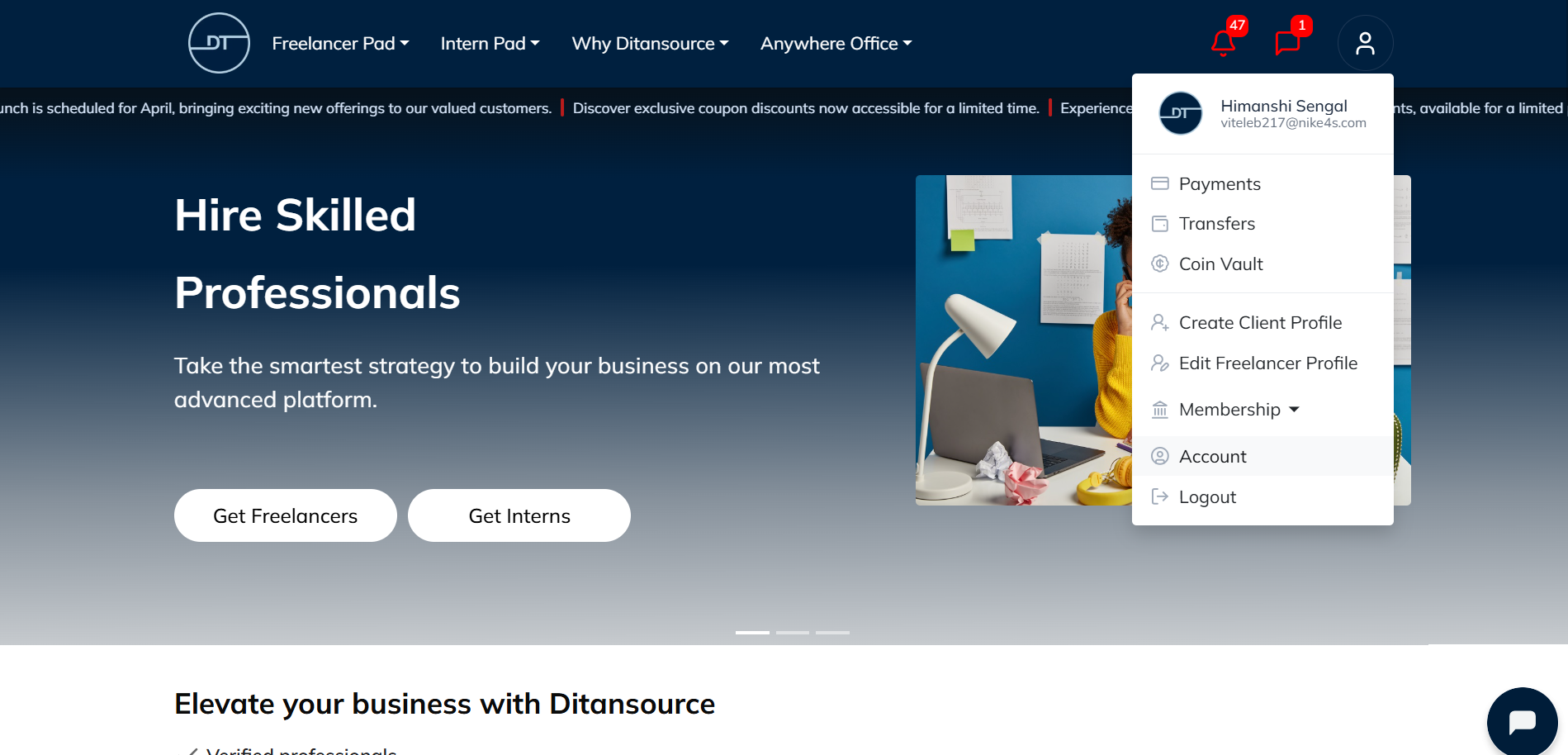
To view your Account Settings, begin by signing in to your Ditansource account using your registered email address and password. Once you have successfully logged in, you will be directed to your dashboard or homepage. In the top-right corner of the screen, you will see your Profile icon. Click on the Profile icon to open the account menu. A drop-down list will appear with several options related to your account, including Payments, Transfers, Coin Vault, Membership, Account, and Logout. From this menu, click on Account to access your account management page.
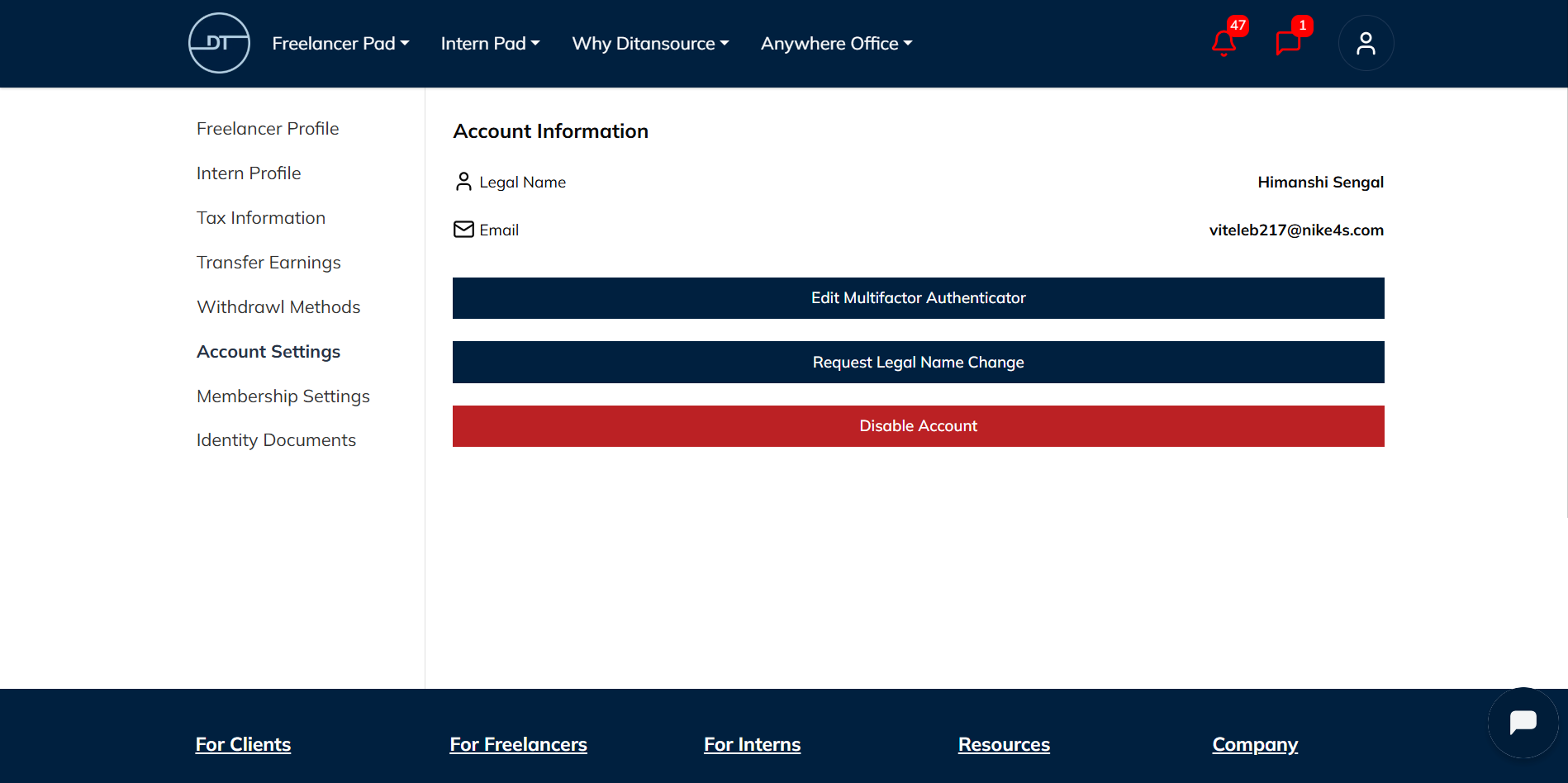
After opening the Account page, you will notice a navigation menu on the left-hand side of the screen. This menu contains several sections, including Freelancer Profile, Intern Profile, Tax Information, Transfer Earnings, Withdrawal Methods, Account Settings, Membership Settings, and Identity Documents. Click on Account Settings to open the page where you can manage your account information and security preferences.
The Account Settings page displays your registered Legal Name and Email Address, allowing you to review the information associated with your Ditansource account. If you need to make changes to certain account settings, you can do so directly from this page using the available options.
One of the features available in Account Settings is Multi-Factor Authentication (MFA) management. Multi-Factor Authentication adds an extra layer of security to your account by requiring an additional verification step during sign-in. If you need to update, edit, or reconfigure your MFA settings, simply click on Edit Multifactor Authenticator and follow the on-screen instructions. Enabling and maintaining MFA is strongly recommended, as it helps protect your account from unauthorized access and enhances the overall security of your personal information.
If your legal name has changed due to marriage, legal documentation, or any other valid reason, you can request an update by selecting Request Legal Name Change. After submitting your request, you may be required to provide supporting documentation to verify the change. Once your request has been reviewed and approved, your account information will be updated accordingly. This process helps ensure that the information associated with your Ditansource account remains accurate and complies with verification requirements.
The Account Settings page also provides the option to Disable Account if you no longer wish to use Ditansource. Clicking the Disable Account button will begin the account deactivation process. Before disabling your account, it is recommended that you complete any ongoing work, withdraw any available earnings if applicable, and ensure there are no pending account activities. Disabling your account may limit your access to Ditansource services, so you should carefully review your account before proceeding.
It is a good practice to review your Account Settings periodically to ensure that all your personal information is accurate and your security settings remain updated. Keeping your registered email address current allows you to receive important notifications, account updates, and security alerts without interruption. Regularly checking your account information also helps you quickly identify and resolve any issues that may affect your account.
By following these steps, you can easily view and manage your Account Settings on Ditansource. The Account Settings page is designed to provide quick access to your account information while giving you control over important security and account management features. Whether you need to manage Multi-Factor Authentication, request a legal name change, or disable your account, everything can be completed from a single location within your account dashboard. If you experience any issues while accessing or updating your Account Settings, or if you require additional assistance, please contact the Ditansource support team at contact@ditansource.com, and they will be happy to help you.