
How to View Coin Transaction History
Keeping track of your Ditansource Coin transactions is important for monitoring your account activity and maintaining an accurate record of all coin-related operations. The Coin Transaction History feature allows you to view every transaction associated with your Coin Vault, including coin credits, debits, transfers, and other related activities. Whether you want to verify a recent transaction, review your account history, or locate a specific record, Ditansource makes it easy to access all your coin transactions in one place.
To view your coin transaction history, first sign in to your Ditansource account using your registered email address and password. Once you have successfully logged in, you will be directed to your dashboard. In the top-right corner of the screen, click on your Profile icon to open the account menu. A drop-down list containing various account options will appear.
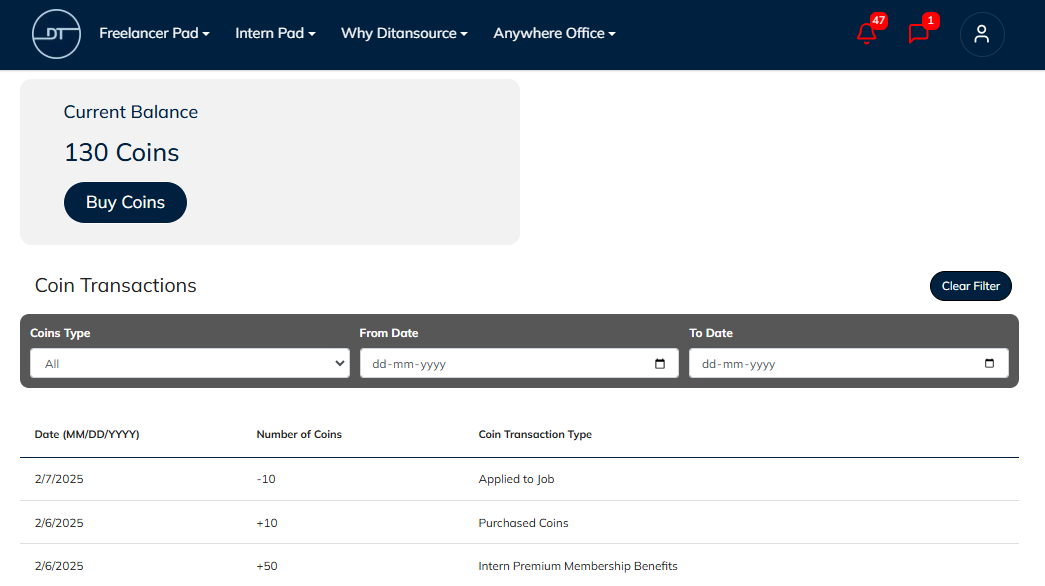
From the menu, click on Coin Vault. This will open your Coin Vault page, where you can manage your Ditansource Coins and view your complete transaction history. The page displays all coin-related activities associated with your account, allowing you to review each transaction whenever needed.

Your Coin Transaction History includes important details for every transaction, such as the transaction type, amount of coins, transaction date, status, and any other relevant information available for that activity. This provides a complete overview of your Coin Vault activity and helps you keep track of your coin balance over time.
If you are looking for a specific transaction, you can use the available filter options to narrow down the results. Instead of manually searching through your entire transaction history, simply apply the appropriate filters to quickly locate the transaction you need. Using filters saves time and makes it easier to find transactions based on your preferred criteria.
Regularly reviewing your Coin Transaction History is a good practice, especially if you frequently use Ditansource Coins for platform activities. Monitoring your transaction history helps you verify completed transactions, identify recent coin activity, and ensure that your account records are accurate. It can also be useful for maintaining personal financial records or resolving any transaction-related questions.
If you are unable to locate a particular transaction, first confirm that you have selected the appropriate filter options or clear the filters to display the complete transaction history. You should also verify that the transaction has been successfully completed before searching for it. Recently completed transactions may take a short time to appear depending on processing status.
The Coin Vault is designed to provide users with a secure and organized way to manage Ditansource Coins while maintaining complete visibility of all account activity. Having easy access to your transaction history allows you to monitor your coin usage with confidence and maintain accurate records whenever required.
By following these steps, you can easily view your Coin Transaction History on Ditansource and keep track of all your coin-related activities. If you experience any issues while accessing your Coin Vault or viewing your transaction history, or if you need additional assistance, please contact our support team at contact@ditansource.com, and we will be happy to assist you.